¶ User Guide: Translations
Change the storefront text for Wishlist and Loyalty, and add other languages for your shoppers.
Open: Translations in the app navigation.
Published guide: Translations
¶ Edit text
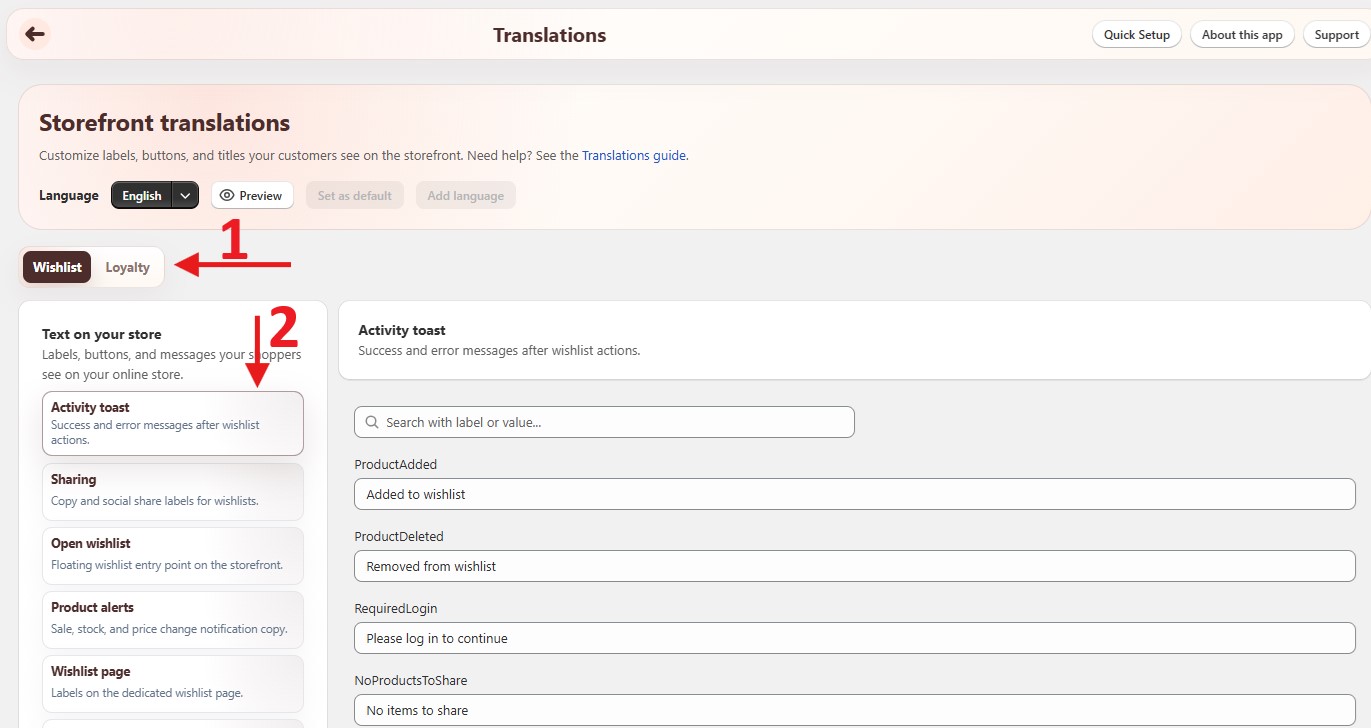
- Open Translations.
- Pick a language in Select language.
- Choose a tab:
- Wishlist - buttons, wishlist page and drawer, popups, alerts, sharing, compare, and more.
- Loyalty - the Rewards panel (guest and logged-in copy, tabs, buttons, and status messages).
- Pick a section on the left (for example Product page button or Wishlist drawer).
- Edit the text fields.
- Click Save in the save bar.
After saving, wait about 30 seconds, then click Preview to open your storefront in that language.
The loyalty program name and point names are not set here. Change them in Loyalty Settings → Program.
¶ Wishlist sections
| Section | What it covers |
|---|---|
| Activity toast | Success and error messages after wishlist actions. |
| Sharing | Copy and social share labels. |
| Open wishlist | The floating wishlist entry point. |
| Product alerts | Sale, stock, and price change notification text. |
| Wishlist page / Shared wishlist page | Labels on the wishlist page and on shared wishlists. |
| Wishlist drawer | Labels when the drawer is open. |
| Product page button / Collection card button | Wishlist buttons on product pages and product cards. |
| Popups / Reminder popup | Confirm dialogs, create-wishlist modals, and saved-item reminders. |
| Back in stock | Notify-me labels for sold-out products. |
| Accessibility | Screen reader labels. |
| Common labels | Shared buttons, titles, and messages. |
| Product compare | Compare selection and table labels. |
| Save count | Caption and tooltip for how many shoppers saved a product. |
| Guest email opt-in | Popup text after a guest saves an item. |
| Save for later | Button and toast text for moving a cart line to the wishlist. |
¶ Add a language
- Click Add language.
- Select the language and click Add language.
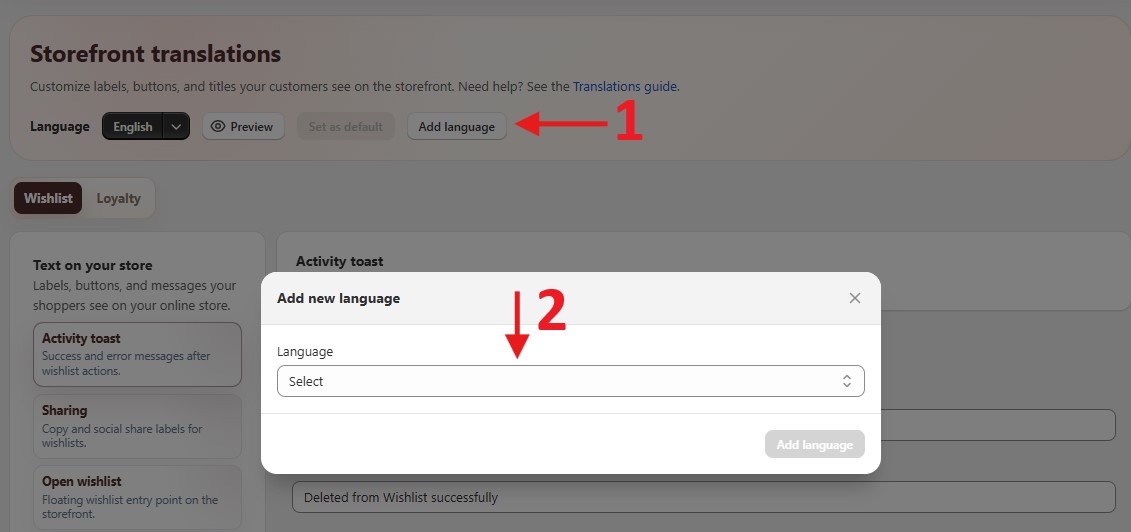
- Translate the text, then click Save.
Shoppers see the app text in a language only when that language is also published in Shopify (Settings → Languages).
| Plan | Languages |
|---|---|
| Free | 1 |
| Basic | 3 |
| Premium | 10 |
| Ultimate | 20 |
When you reach the limit, Add language is disabled until you upgrade.
¶ Default language
The default language is used for your store's default language, and as a fallback when a shopper's language has no translation.
To change it, select a language and click Set as Default. Save any edits first.
How the storefront picks text:
- Store default language → the default translation.
- Another language → that language's translation (for example
pt-BR, thenpt). - No match → the default translation.
¶ Tips
- After an app update you may see "We've updated some items in this language." New text was added - review it and click Save.
- The Version under the editor shows which text version this language uses.
- Use Preview after saving to check long text on mobile.