¶ User Guide: Loyalty Referral Reviews
Approve or reject referrals held for manual review before awards go out.
Open: Loyalty Referral Reviews in the app navigation.
Published guide: Loyalty Referral Reviews
Plan note: Referral (and this review queue) needs Basic and above, with Referral enabled.
¶ When reviews appear
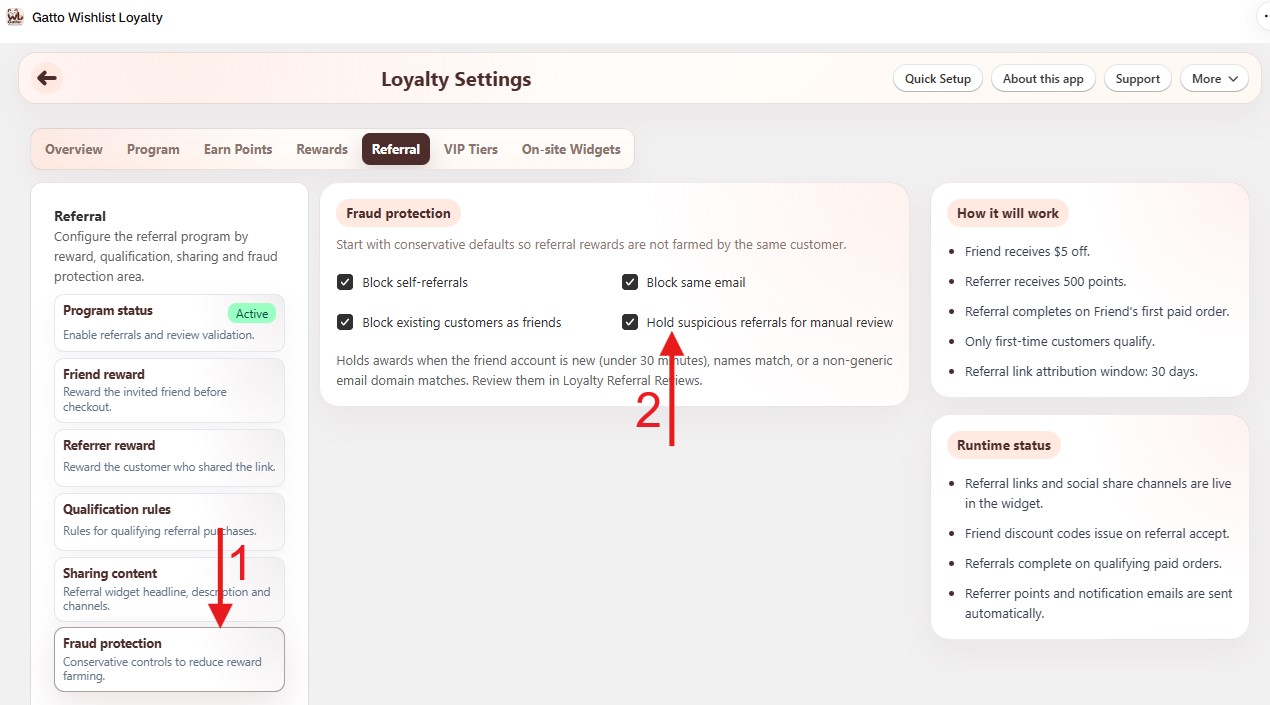
- Open Loyalty Settings → Referral → Fraud protection.
- Enable Hold suspicious referrals for manual review (and any other fraud checks you want, such as block self-referrals).
- Matching referrals stay pending here until you decide.
If the queue is empty, either no referrals matched the fraud rules, or the hold setting is off.
¶ Review a referral
- Open Loyalty Referral Reviews.
- Open a held referral and check friend, referrer, and order context.
- Choose an action:
- Approve - release the configured friend / referrer rewards.
- Reject - block the rewards for that referral.
- Confirm the outcome on Loyalty Members (balances / referral activity) if needed.
¶ Tips
- Do not use Loyalty Members → Adjust points to clear a held referral - approve or reject here so referral status stays correct.
- After changing fraud settings, new suspicious referrals appear in this queue; already-completed referrals are not moved back.